Introduction: The 2026-friendly explainer of autonomous AI agents and why they matter
In 2026, autonomous AI agents have moved from buzzword to business backbone. These systems use large language models (LLMs), tools, memory, and feedback loops to perform tasks end to end—no constant human prompting required. They book meetings, analyze contracts, triage tickets, monitor data pipelines, draft code, and even coordinate with other agents to achieve goals.
What changed? Two shifts: first, mainstream LLMs gained reliable tool-calling and function interfaces, allowing models to act in the world rather than just generate text. Second, engineering best practices matured—workflow graphs, retrieval-augmented generation (RAG), guardrails, and evaluation harnesses that tame hallucinations, reduce cost, and deliver enterprise-level reliability.
If you’re a product leader, engineer, or marketer, understanding how AI agents work helps you plan roadmaps, control risk, and spot ROI. This guide gives you a 2026-friendly playbook: what agents are, how they reason and act, architectures to consider, a step-by-step build path, and the KPIs that separate prototypes from production.
For broader context on software agents, see Wikipedia: Software agent and Autonomous agent. To explore more thinking on AI and product strategy from Michael Grant, visit the main site or subscribe via the RSS feed.
Quick Summary (TLDR): How AI agents work in one minute
- Agents = LLM + tools + memory + policy. The language model plans and reasons, tools let it act (APIs, databases, apps), memory supplies context, and policies enforce guardrails.
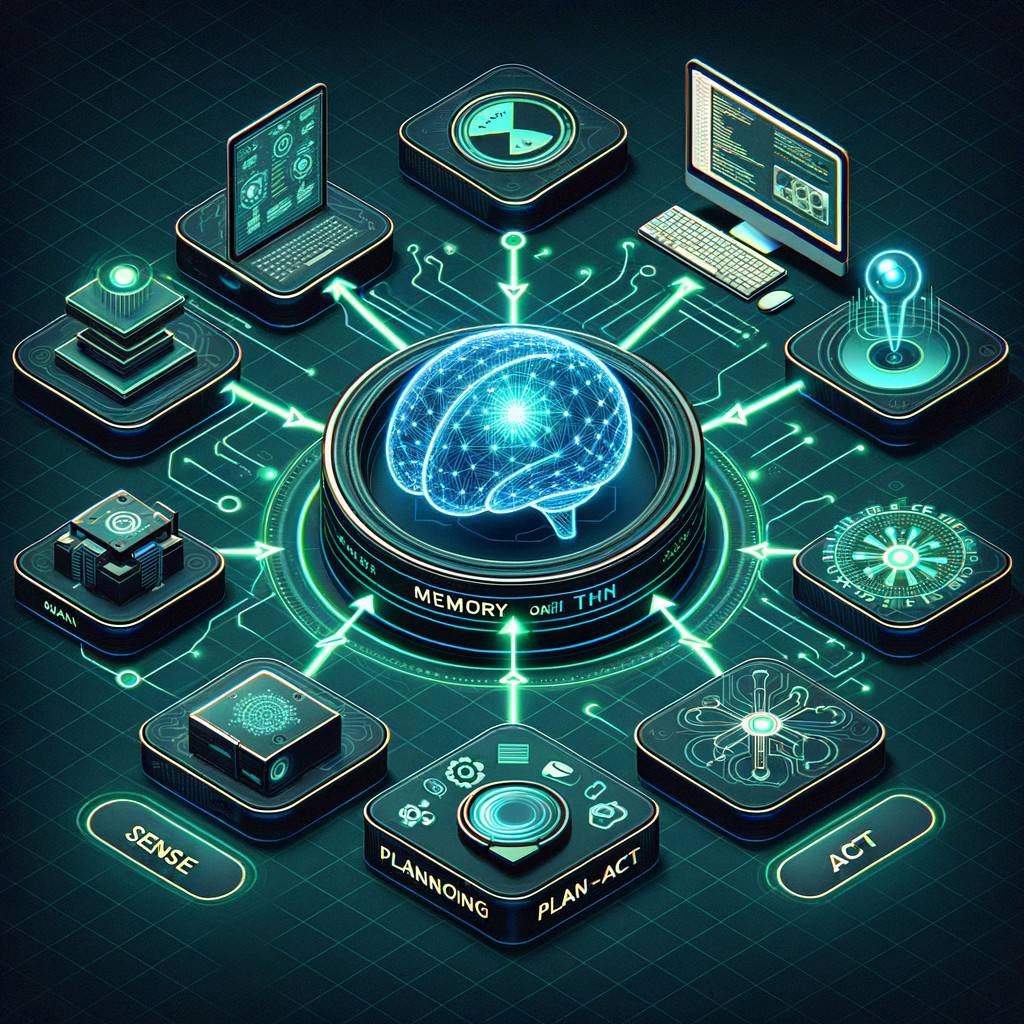
- Core loop: Sense → Plan → Act → Learn. The agent perceives state, breaks goals into steps, calls tools, and updates memory/strategy based on results.
- Knowledge via RAG. A vector database retrieves relevant documents, facts, and examples to ground the agent’s answers and reduce hallucinations.
- Architectures vary. ReAct (reason+act), tool-calling agents, multi-agent swarms, and workflow graphs handle different complexity and reliability needs.
- Guardrails keep it safe. Input validation, output filtering, auth scopes, rate limits, and policy prompts prevent errors and misuse.
- KPIs matter. Track success rate, hallucination rate, cost per task, and latency. Optimize with caching, model selection, deterministic plans, and offline evaluation.
- Production readiness. Add observability, human-in-the-loop (HITL) for edge cases, and rollback strategies to reach SLAs.
What Is an AI Agent? Key concepts, autonomy levels, and real-world use cases
An AI agent is a system that can pursue goals by reasoning, deciding, and taking actions through tools. Unlike a single prompt-and-answer chatbot, an agent iterates: it plans steps, calls APIs, updates its memory, and adapts based on outcomes.
Key concepts:
- Autonomy: The degree of initiative. Low autonomy: respond to a request with a single tool call. Medium: plan multi-step workflows with approval gates. High: run continuously, monitor triggers, or coordinate multiple agents.
- Tools & environment: External functions the agent can call—CRM APIs, search engines, SQL, email, calendars, vector databases, code interpreters.
- Memory: The agent’s scratchpad and long-term store. Includes short-term chain-of-thought (not surfaced to users), episodic logs, and semantic knowledge via RAG.
- Policy & guardrails: Rules that constrain what the agent can do, how it handles sensitive data, and when to ask for human approval.
Real-world use cases in 2026:
- Sales & marketing: Personalized outreach, product research, competitive briefs, web publishing pipelines.
- Support & success: Ticket triage, root-cause suggestions, guided troubleshooting, proactive alerts.
- Operations & finance: Invoice matching, anomaly detection, procurement workflows, compliance checks.
- Product & engineering: Issue reproduction, test authoring, code refactoring suggestions, release notes.
For a cross-industry perspective, see Forbes Tech Council coverage of agent-driven automation and HubSpot resources on scaling content and lifecycle workflows.
How AI Agents Work Under the Hood: Sense–Plan–Act loop, tool use, memory, and RAG
The beating heart of an agent is the Sense–Plan–Act loop. Each pass reduces uncertainty and progresses toward a goal while recording evidence.
- Sense: The agent ingests a user goal, system state, and fresh context. This may include documents from RAG, calendar events, prior attempts, and tool outputs.
- Plan: The LLM proposes a stepwise plan: which tools to call, in what order, with what success criteria. Plans can be free-form text, structured JSON, or nodes in a workflow graph.
- Act: The orchestrator executes tool calls with validated parameters. Results are parsed and summarized into the agent’s scratchpad. If a step fails, the plan is revised.
- Learn: The agent updates memory: what worked, what didn’t, and why. It may write summaries to a vector store for future retrieval, improving performance over time.
Tool use converts language intent into action. Modern platforms expose function schemas (name, args, description) and let the model choose which to invoke. See OpenAI’s function calling for an overview of structured tool selection.
Memory includes:
- Short-term: The agent’s internal notes and intermediate calculations within a session.
- Episodic: Logs of past tasks, outcomes, and user preferences.
- Semantic: RAG over a vector database to ground responses with citations and enterprise knowledge.
RAG lowers hallucinations by retrieving relevant passages and feeding them into the prompt. See Prompt engineering for techniques to blend instructions with retrieved facts.
Architectures in 2026: ReAct, tool-calling, multi-agent swarms, and workflow graphs
Agent architectures have diversified to match business needs, reliability requirements, and budgets. Four patterns dominate in 2026:
- ReAct (Reason + Act): The model alternates between reasoning and tool use. It writes a plan, executes a tool, inspects the result, and iterates. ReAct is flexible and works well for research, support triage, and ad hoc tasks. See the paper ReAct: Synergizing Reasoning and Acting.
- Tool-calling agents: Models explicitly output JSON that matches function schemas. The orchestrator then calls the tool and returns the outcome. This is deterministic, debuggable, and easy to secure with argument validation.
- Multi-agent swarms: Several specialized agents collaborate—a Planner, Researcher, Coder, and Reviewer, for instance. They communicate via messages and shared memory. Swarms shine on complex, multi-domain tasks but need strict policies to prevent cost blowups.
- Workflow graphs (DAGs): Plans materialize as directed graphs with typed nodes (retrieve, analyze, decide, act). Nodes have SLAs, retries, and circuit breakers. Great for production reliability and compliance audits.
Which to choose? Start with tool-calling for narrow tasks, graduate to ReAct for exploratory problem solving, then adopt workflow graphs or a small swarm when you need throughput, transparency, and safety. For risk governance, consult the NIST AI Risk Management Framework.
Build a Simple Agent Step-by-Step: model choice, tools, prompts, memory, guardrails, evaluation
Here’s a pragmatic blueprint you can follow to build a dependable agent from scratch.
1) Choose a model
- Closed-weight LLMs: Great zero-shot reasoning and tool following; predictable costs; strong safety. Consider for customer-facing tasks.
- Open-weight LLMs: Fine-tune for brand voice or domain knowledge. Pair with strong filters and a reliable orchestrator for parity with closed models.
- Strategy: Start with a high-quality model for planning and a cheaper model for classification or summarization steps.
2) Define tools with clear schemas
- List essential actions: search, retrieve docs, query analytics, send emails, write tickets, update CRM.
- Specify JSON schemas with argument types, required fields, and constraints. Validate at runtime.
- Scope credentials narrowly. Each tool runs under least-privilege IAM with rate limits.
3) Craft prompts that set policy and goals
- Use a system prompt that defines role, tone, constraints, PII handling, and escalation rules.
- Provide examples of good tool calls and well-formed outputs so the model learns format adherence.
- Separate prompts for planning versus execution to reduce drift.
4) Add memory and RAG
- Embed knowledge bases and past task summaries into a vector database.
- Retrieve top-k chunks by semantic similarity and re-rank by recency or source authority.
- Write brief post-task summaries to memory for future context and personalization.
5) Guardrails
- Pre-check inputs for prohibited content, secrets, or unsupported requests.
- Post-check outputs for policy violations, PII, or malformed JSON.
- Add approval gates for sensitive actions (e.g., sending emails over 100 recipients).
6) Evaluation before launch
- Assemble a golden dataset of tasks with expected outputs.
- Measure task success, factuality, latency, tool accuracy, and cost per task.
- Run regression tests on every prompt or tool change. Keep a diff of traces to spot behavior shifts.
As you operationalize, add observability, canary releases, and rate-based circuit breakers. For additional product strategy insights, explore more articles from Michael Grant via the homepage.
KPIs, Reliability, and Cost Control: success rate, hallucinations, latency, and optimization tips
Measuring the right KPIs turns agent projects from demos into dependable services. Focus on a small, actionable set and wire them into your release process.
Core KPIs
- Task success rate: Percentage of tasks that meet acceptance criteria. Track by task type, customer segment, and tool combination.
- Hallucination rate: Incidence of unsupported claims or missing citations. Use RAG and output verification to suppress.
- Latency (p50/p95): Time from request to final output. Budget per step; parallelize fetches; cache embeddings and retrieval.
- Cost per task: Token usage + tool/API charges. Alert on anomalies and runaway loops.
- Escalation rate: Cases requiring human review—useful for staffing and training data.
Reliability tactics
- Prefer deterministic tool selection with explicit schemas and argument validators.
- Use workflow graphs to enforce retries, timeouts, and circuit breakers.
- Add self-checks: have the model critique its own output against a checklist.
- Adopt HITL for high-risk actions; record feedback to improve prompts and policies.
Cost optimization
- Right-size models: Use smaller models for routine steps; reserve premium models for planning or critical reasoning.
- Caching: Memoize retrieval results, deterministic summaries, and tool responses with TTLs.
- Prompt hygiene: Keep prompts concise, avoid unnecessary role-play, and strip irrelevant context to reduce tokens.
For governance and benchmarks, check resources from Stanford HAI and the NIST AI RMF.
Conclusion: The path to trustworthy, production-grade agents
Building agents that real customers can trust is not magic—it’s engineering discipline applied to modern AI. Start with a clear goal, robust tool schemas, and a reliable planning model. Layer in memory and RAG for factual grounding. Add guardrails, workflow graphs, and HITL to reach your SLA. Then iterate with telemetry and offline evaluation to lower cost and increase success rates.
Organizations that master this lifecycle will transform service delivery, reduce toil, and unlock new growth levers. The question is no longer whether to deploy agents, but how to deploy them responsibly and measure their business impact. Explore more AI strategy content and implementation guides via Michael Grant’s site and stay updated through the RSS feed.
FAQ: Common questions about AI agents in 2026
Are AI agents just chatbots?
No. A chatbot answers questions within a conversation. An agent plans, calls tools, updates memory, and completes tasks end to end. Chatbots often become agents when you add tool-calling, RAG, and policies.
How do agents avoid hallucinations?
They use retrieval-augmented generation (RAG) to ground outputs in source documents, enforce output validation (e.g., JSON schema), run self-checks, and sometimes require human approval for high-risk actions.
Can agents work with confidential data?
Yes, with the right architecture. Use least-privilege access, encrypt data in transit and at rest, segregate tenants, and redact PII in logs. Policy prompts must specify compliance rules and escalation paths. Reference: NIST AI RMF.
What’s the difference between ReAct and workflow graphs?
ReAct is flexible and great for discovery. Workflow graphs are explicit and auditable; they enforce retries, timeouts, and cost limits. Many teams plan with ReAct, then distill stable patterns into graphs for production.
Do I need multiple agents (a swarm)?
Only if the domain is complex or benefits from specialization (e.g., Planner, Researcher, Builder, Reviewer). Start simple and add agents when you see clear bottlenecks.
Which KPIs matter most?
Task success, hallucination rate, latency p95, and cost per task. For marketing and sales agents, also track conversion and customer satisfaction.
What’s a safe launch plan?
Pilot with internal users, enable HITL, log all traces, set strict rate limits, and define rollback triggers. Roll out by segment and monitor KPIs in real time.
How do I explain agents to executives?
Describe them as autonomous digital workers that follow policy, call tools, and learn over time. Emphasize measurable outcomes: faster cycle times, higher resolution rates, and lower cost per task. See Forbes Enterprise Tech for executive-friendly perspectives.
Where can I learn more?
Review foundational concepts on Wikipedia, best practices from Stanford HAI, and follow updates on Michael Grant’s blog.